


Novelove
4.45.74K Reviews
App Specs
- Version
- 1.0.7
- Updated On
- License
- Free
- Downloads
- 500,000+
- Developer
- WORDSFLY LIMITED
- Categories
- Books & Reference
- Platform
- Android
Screenshots

 Analysis by AppCompare
I tend to judge a reading app by two practical questions: can I find a story that suits my mood, and can I keep reading comfortably when my surroundings or energy change? Novelove is built around discovering novels, reading them on a phone, and sharing reactions with other readers. I find that combination appealing, especially for someone who wants fiction close at hand rather than a separate e-reader and a carefully planned reading session.
It is a Books & Reference app from WORDSFLY LIMITED, with a teen content rating. It is free to install, though in-app purchases range from $9.99 to $149.99 per item, so “free” should not be taken to mean every book or feature will cost nothing. The app has a 4.4 average from around 76,000 ratings and over 100,000 installs. Those figures suggest an established audience, but they cannot tell you whether its particular stories or reading style will suit you.
Finding a story and making the page work for you
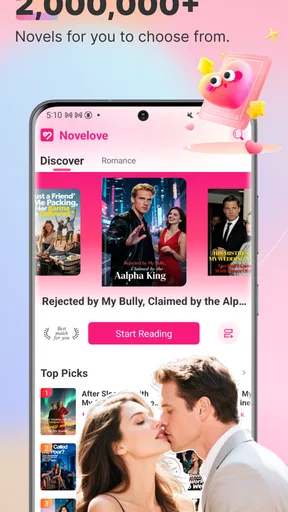
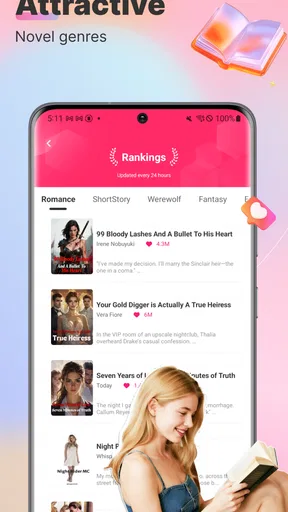
Right off the bat, Novelove greets you with a user-friendly interface that's as inviting as your favorite reading nook. The app's design is sleek, making it a breeze to find your next read. Whether you're a fan of romance, mystery, fantasy, or sci-fi, Novelove has a little bit of everything. The genres are neatly categorized, so you can easily jump to your preferred section without any hassle.
One of the coolest features is the personalized recommendations. The app learns your reading preferences and suggests books that are right up your alley. It's like having a personal librarian who knows exactly what you love. And let me tell you, their suggestions are pretty spot-on!
Readability that adapts to the moment
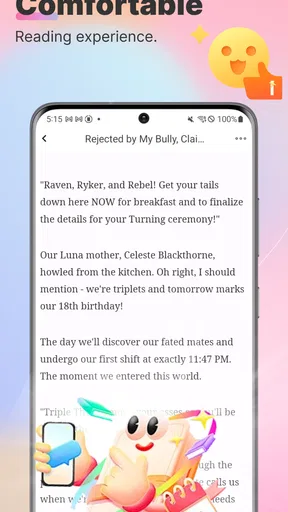
Once you've picked a book, the reading experience is where the magic happens. The text is crisp and clear, with adjustable settings for font size and background color, ensuring your eyes are never strained. Night mode is a lifesaver for those late-night reading sessions when you just can't put the book down.
The app also allows you to bookmark pages, highlight passages, and even make notes. This is super handy if you're the kind of reader who likes to jot down thoughts or keep track of plot twists and character developments. Plus, you can sync your progress across devices, so whether you're on your phone or tablet, your place in the story is never lost.
Reading alongside other people
What makes it stand out is its vibrant community. You can connect with other readers, join discussions, and even interact with authors. It's like being part of a massive book club where you can share your thoughts, theories, and feelings about the stories you're reading. The comment sections are lively and full of insights from fellow book lovers.
Worth Reading Before You Choose

EA SPORTS FC Mobile 26 Is a Bigger Football Game, but It Takes Time

Flipboard Shows What News Apps Must Do Beyond the Feed

Switching to Android Auto Means Rethinking Your Driving Routine

Google Calendar Makes a Crowded Week Easier to Manage

Ludo King Makes the Most of the Minutes Between Plans

Baby Panda World Brings Quick Play to Modern Phones, but Its Game Library Feels Busy
For aspiring writers, the app offers a platform to share your own stories. It's a fantastic opportunity to get feedback and build an audience. Who knows? Your story might just be the next big hit on the platform.
Access, cost, and practical limits
While the app offers a plethora of free content, there’s also a subscription model for those who want to unlock premium books and features. It's a reasonable price for what you get, especially considering the quality and variety of stories available.
The app is accessible on both Android and iOS, ensuring that no matter what device you're using, you can always dive into a good book. Plus, the download function means you can read offline, perfect for when you're on the go or without an internet connection.
Small habits that make browsing more useful
I’d treat recommendations as a starting point, not a verdict on what I should read. If a suggestion misses, browsing by genre gives me another route in, while saving a page or passage helps me remember why a story caught my attention. That is a useful distinction: recommendations can reduce the time spent searching, but a reader who already knows exactly what title or author they want may find a conventional library or ebook store more direct.
For a commuter, the practical workflow is simple: choose a story while connected, make sure it is available for offline reading, and use a bookmark before switching tasks. On a crowded bus, a short reading window is easier to resume when the app remembers the page and the reader does not have to search through a chapter again. Offline access is particularly valuable in a tunnel or a weak-signal area, but it is sensible to check that the selected book is ready before relying on it.
Different readers, different kinds of access
Font-size and background controls make the reading surface more adaptable than a fixed printed page, and night mode can be more comfortable in a dim room. These options may help readers who prefer larger text or a darker screen, but they are not a guarantee that every screen, story layout, or interaction will work for every person. I would try a sample of actual reading rather than assume the settings solve every visual or cognitive need.
Motor and sensory comfort also depend on the situation. A reader holding a phone one-handed may find a long session tiring, while frequent tapping, scrolling, or moving between story and comments can interrupt concentration. I’d keep the reading portion simple when attention is limited: adjust the text before settling in, bookmark instead of repeatedly navigating back, and leave discussion for a separate moment. Those habits make the experience less fiddly without assuming the app has controls it does not claim to offer.
Community features are best treated as optional company. Comments can add reader perspectives, but they may also reveal reactions or plot details before someone has finished a chapter. If I want to preserve a surprise, I would read first and open the discussion afterward. Likewise, someone who finds fast-moving social conversations distracting can focus on the story and use the app mainly as a reading space rather than feeling obliged to participate.
When another reading option may fit better
Compared with a basic ebook reader, this app puts discovery and reader interaction closer to the reading experience. That is a real advantage when I want to browse unfamiliar fiction or see what other readers think. A traditional ebook library may be the better choice for someone organizing a personally owned collection, prioritizing a familiar catalogue, or wanting a quieter experience with fewer community elements. The right choice depends less on which format is universally superior and more on whether discovery or collection management matters most to you.
It also makes sense to think about spending before getting attached to a premium title. The app is free to install, but paid items can be costly at the upper end of the listed range. I would explore the free material first, check the cost attached to anything premium before committing, and avoid treating an appealing recommendation as an obligation to buy. That approach is especially useful for casual readers who dip in and out rather than finishing books regularly.
Who is likely to enjoy it
I’d recommend giving it a try if you like serialized or genre fiction, enjoy discovering stories through recommendations, or want a place where reading and reader discussion sit together. It may also suit an aspiring writer who wants to share work and hear responses. The current version is 1.0.6, and it was released on July 21, 2025; it requires Android 6.0 or later. The app is rated for teens, so families should consider that age guidance alongside the content of individual stories rather than assuming every title is suitable for every younger reader.
It is less compelling for readers who mainly want a silent, utility-first ebook shelf, need a particular accessibility feature that is not described here, or prefer to avoid in-app purchases altogether. People with limited data or unreliable connectivity should also plan around their reading sessions instead of assuming every book will be available offline immediately. For those readers, a downloaded personal library or a simpler reader may be a better match.
A considered recommendation
As a realistic everyday choice, I can see myself opening the app during a lunch break, browsing a genre instead of endlessly scrolling general social feeds, and reading a few pages before saving my place. Later, I could return at home, continue on another device, and decide whether the comments add anything to the story for me. That sequence uses discovery, bookmarks, and syncing as practical tools rather than expecting one session to do everything.
The app is developed by WORDSFLY LIMITED, and its appeal comes from bringing story discovery, adjustable reading, and a reader community into one place. I like that it can accommodate a quick chapter as well as a longer reading habit, while still leaving room to choose how social the experience becomes. Its trade-offs are worth keeping in view: premium spending needs attention, community discussion can affect a spoiler-sensitive read, and adaptable display settings do not automatically make every interaction comfortable for every reader.
Novelove is most convincing for readers who want a steady supply of fiction and enjoy the social side of reading, not for someone seeking only a plain digital bookshelf. I’d start with free content, test the text settings with a full chapter, and see whether the recommendations actually lead to books I want to continue. If that routine feels natural, it can be a pleasant reading companion; if I want complete control over a personal catalogue or a quieter, more predictable setup, I’d choose a different kind of ebook app.
Pros
- User-friendly interface enhances reading experience.
- Wide selection of genres for diverse tastes.
- Offline reading mode available for convenience.
- Customizable reading settings for comfort.
- Regular updates with new content.
Cons
- In-app purchases can be pricey.
- Limited free content without subscription.
- Occasional ads disrupt reading flow.
- Requires internet for initial downloads.
- Some stories lack professional editing.
FAQs for Novelove
What is Novelove, and how does it work?
Novelove is a mobile app designed for book lovers, offering a vast library of novels across various genres. Users can browse, read, and even listen to audiobooks. The app features personalized recommendations based on reading preferences, allowing users to discover new authors and stories tailored to their interests.
Is Novelove free to use, or does it require a subscription?
Novelove offers a freemium model. Users can access a selection of books for free, but a subscription is needed for full access to the entire library and premium features. The subscription also removes ads, enhances the reading experience, and provides offline access to downloaded content.
What platforms is Novelove available on?
Novelove is available for both Android and iOS devices. Users can download it from the Google Play Store for Android or the Apple App Store for iOS. The app is optimized to run smoothly on smartphones and tablets, ensuring an enjoyable reading experience across different devices.
Can I download books to read offline in Novelove?
Yes, Novelove allows users to download books for offline reading. This feature is particularly useful for those who want to enjoy their favorite novels without an internet connection, such as while traveling or in areas with limited connectivity. However, offline access may require a subscription.
Does Novelove offer a social feature to connect with other readers?
Novelove includes social features that let users connect with fellow readers. Users can share book reviews, join discussions, and participate in book clubs within the app. This community aspect enhances the reading experience by allowing users to engage with others who share similar literary interests.


